


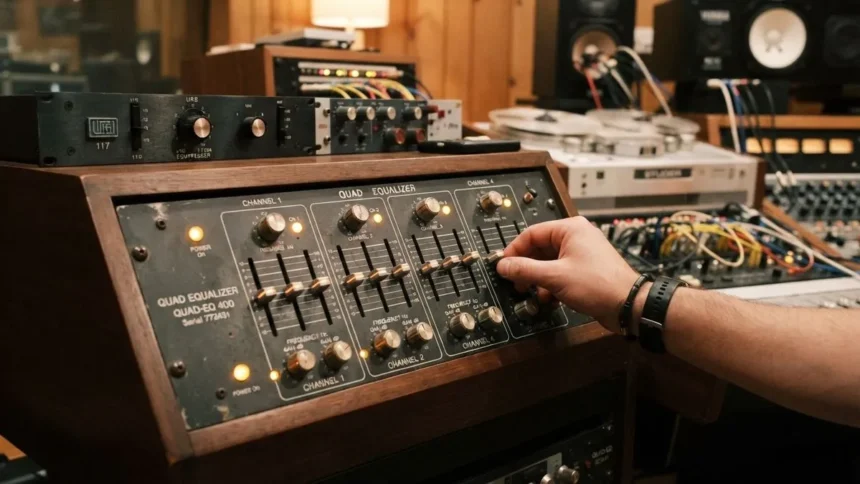
A quad equalizer usually means a four-band equalizer that divides tonal control into four sections, commonly low, low-mid, high-mid, and high. But the term isn’t completely standardized: in audio equipment, it generally describes four frequency-control bands, while in high-speed electronics, “quad equalizer” can refer to a four-channel signal-conditioning device.
- What Is Quad Equalizer?
- What the Four Bands Really Control
- Quad Equalizer Controls: Gain, Frequency and Q
- Why Four Bands Can Be More Useful Than Twenty
- Shelf vs. Bell: The Detail That Changes Everything
- How to Tune a Quad Equalizer Without Guessing
- A Practical Symptom-to-Adjustment Framework
- When You Should Not Use a Quad Equalizer
- Quad Equalizer vs. Four-Band Parametric EQ
- Quad Equalizer in Electronics: A Different Meaning
For audio, the interesting question is not simply what the four knobs do. The useful question is which problem each band can solve, what adjustment is likely to work, and when EQ is the wrong tool altogether.
What Is Quad Equalizer?
A quad equalizer gives you four independent opportunities to alter the frequency balance of an audio signal. Depending on the design, each band may provide gain and frequency controls, while parametric versions may also provide Q or bandwidth control.
There is no universal frequency assignment for the four bands. Midas, for example, describes a four-band design covering Bass from 20–400 Hz, Lo Mid from 100 Hz–2 kHz, Hi Mid from 400 Hz–8 kHz, and Treble from 1–20 kHz. Those ranges overlap deliberately, allowing the user to choose where an adjustment begins rather than forcing each band into an isolated frequency box.
That overlap reveals something beginners often miss: the four labels are control regions, not four separate pieces of the audible spectrum.
What the Four Bands Really Control
Low: weight, rumble, and physical impact
The low band influences bass energy and the sense of physical weight. Kick drums, bass instruments, low synthesizers and unwanted rumble can all contribute here.
The mistake is treating every weak-sounding recording as a bass problem. If the Bass is already present but the recording sounds congested, increasing the low band can make the problem worse by consuming headroom without improving definition.
A useful diagnostic question is: “Is the bass missing, or is something else masking it?” If the Bass becomes clearer after reducing competing low-mid energy, boosting Bass was never the real solution.
Low-mid: the difference between body and congestion
The low midrange is where a recording can acquire useful warmth or become cloudy. Voices, guitars, piano, drums and many other sources occupy this region simultaneously.
This makes the low-mid band particularly valuable on a four-band EQ. A small, targeted cut can create separation without brightening the entire recording. In a microphone or vocal chain, low-mid reduction can also help counter excessive proximity-effect buildup.
The important distinction is between thinness and muddiness. If a vocal already lacks body, cutting low mids can make it worse. If it has plenty of body but sounds congested, the same control may produce a much cleaner result.
High-mid: intelligibility versus aggression
High-mid frequencies influence articulation, presence, and the way vocals or instruments project through a mix.
Increasing this region can make speech easier to understand because important consonants and articulation information become more prominent. But the same adjustment can make a vocal, guitar or snare sound aggressive when pushed too far.
This is why “add mids for clarity” is incomplete advice. The useful adjustment depends on which frequency is missing or excessive and how wide the correction needs to be.
High: brightness, detail and the temptation to overcorrect
The high band affects perceived brightness and fine detail. A dull recording may benefit from some high-frequency lift, while a harsh recording may need attenuation.
However, high-frequency boosting is often used as a shortcut for clarity. If the actual problem is excessive low-mid energy, adding Treble creates a brighter version of the same congested recording rather than removing the congestion.
Quad Equalizer Controls: Gain, Frequency and Q
A parametric four-band EQ normally gives you three important controls.
Gain determines how much the selected region is boosted or cut. Frequency determines where the adjustment is centered. Q controls how narrowly or broadly the adjustment acts around that frequency.
Shure describes parametric EQ as offering control over frequency, gain and bandwidth beyond what a conventional graphic EQ provides.
Q is particularly important when correcting a specific problem. A high-Q setting affects a narrower area, while a lower-Q setting spreads the correction over a wider region. QSC hardware documentation, for example, specifies adjustable Q values for its parametric bands and notes that Q controls the width of the affected frequency region.
Think of it this way:
- Broad Q + small cut: tonal shaping
- Narrow Q + small cut: targeted correction
- Narrow Q + large boost: useful mainly for locating a resonance, not usually for the final sound
- Large boosts across several bands: a warning that the underlying problem may not be EQ
Why Four Bands Can Be More Useful Than Twenty
More EQ bands provide more control, but control is not automatically the same as better results.
A four-band EQ forces you to identify the dominant problems. If the recording is boomy, muddy and harsh, you must decide which problem is primary rather than randomly moving ten sliders.
That constraint can improve decision-making. Professional four-band designs often build on this concept: low and high bands handle broad tonal shaping, while the middle bands provide more focused corrections. Some designs use shelving filters on the outer bands and parametric bell filters in the middle. Midas, for example, lets its Bass and treble sections operate as shelves or bells, while the two middle sections remain parametric.
Shelf vs. Bell: The Detail That Changes Everything
A bell filter concentrates its effect around a selected frequency and then decreases on either side. It’s useful when you want to target a specific region.
A shelving filter behaves differently: above or below its turnover frequency, it affects a broader portion of the spectrum.
This means a low-shelf boost is not simply a “wider low-frequency bell.” Its response extends across the lower spectrum differently. Likewise, a high shelf can raise the overall top end rather than targeting one narrow treble peak.
Some four-band EQs let you switch the outer bands between these filter types, while others permanently assign their shapes. Midas and several hardware designs document this distinction explicitly.
How to Tune a Quad Equalizer Without Guessing
Use the following workflow instead of copying a preset from the internet.
1. Start flat
Set the four bands to neutral if possible. This gives you a known reference point.
2. Describe the problem before touching a control
Don’t say “the sound is bad.” Identify the symptom:
- Too boomy
- Thin
- Boxy
- Muddy
- Buried
- Harsh
- Dull
- Excessively bright
- Feedback-prone
The description determines where you investigate.
3. Correct the likely cause, not the symptom
If a vocal is buried because of low-mid congestion, cutting that congestion may work better than adding high-mid gain.
If the entire recording is dull, a broad high-shelf adjustment may make more sense than using a narrow bell somewhere in the Treble.
4. Use small changes first
A modest adjustment is easier to evaluate and less likely to damage neighboring frequencies. If you immediately apply extreme settings, you may correct one problem while creating two others.
5. Bypass the EQ
Compare the processed signal with the original at a similar perceived loudness. Otherwise, the louder version can appear “better” simply because it is louder.
6. Remove unnecessary bands
If a band isn’t solving a defined problem, return it to neutral. An EQ shouldn’t be busy just because four controls are available.
A Practical Symptom-to-Adjustment Framework
| What you hear | First area to investigate | What to try | Mistakes to avoid |
| Excessive rumble | Low | Reduce unwanted low energy | Cutting useful bass |
| Boomy bass | Low / low-mid | Identify whether the buildup is broad or concentrated | Automatically boosting treble |
| Muddy vocal | Low-mid | Try a controlled low-mid cut | Removing too much vocal body |
| Vocal lacks presence | High-mid | Try a modest presence adjustment | Making the voice aggressive |
| Harsh vocal | High-mid | Narrow the suspected problem before cutting broadly | Cutting all upper mids |
| Dull mix | High | Try a broad high adjustment | Adding a sharp treble peak |
| Feedback | Specific resonant frequency | Locate the frequency and use a focused cut | Applying large broad cuts |
When You Should Not Use a Quad Equalizer
EQ cannot repair every audio problem.
If a speaker is physically damaged, the room has severe acoustic problems, the microphone is positioned poorly, or the recording contains clipping, frequency adjustment may only disguise the symptom.
Likewise, if you need to remove a narrow noise source, a dedicated filter may be more appropriate than sacrificing a large portion of an EQ band.
A four-band EQ is most effective when the problem is genuinely spectral imbalanced.
Quad Equalizer vs. Four-Band Parametric EQ
The terms are often used interchangeably in audio, but they describe slightly different things.
“Four-band” tells you how many EQ sections you have. “Parametric” tells you how much control each section provides.
A four-band parametric EQ lets you choose frequency, gain, and Q for individual bands. A four-band EQ with fixed frequencies gives you considerably less control.
Some equipment combines shelving and parametric behavior. Other products use four bell filters. For example, Roland documents a four-band parametric equalizer with independently adjustable frequency and bandwidth, while other four-band designs use fixed or switchable filter types.
Therefore, don’t judge an EQ by the phrase “four-band” alone. Look at its actual frequency ranges, filter types, Q controls and gain limits.
Quad Equalizer in Electronics: A Different Meaning
The phrase quad equalizer is not restricted to audio.
In high-speed digital electronics, an equalizer compensates for signal degradation introduced during transmission. A device described as a quad equalizer may therefore contain four signal channels rather than four audio frequency bands.
That distinction matters when researching components. If a datasheet discusses DisplayPort, high-speed lanes, signal integrity or transmission loss, you are dealing with electronic signal equalization, not Bass, mids and treble.
The same two-word phrase can therefore describe fundamentally different technologies depending on the product category.