



Recovering deleted photos is a challenging task, especially if your photo was lost a long time ago. Some captured moments, such as childhood smiles, family gatherings, journeys, and milestones frozen in time, can never be repeated. When you find that a photo has been deleted from your PC, especially if it was deleted long ago and without any backup, the loss can feel permanent and distressing.
Fortunately, those photos are not lost forever. In reality, while recovery can be difficult, there are still methods and possibilities worth exploring that may help retrieve old photos thought to be lost. In this article, we’ll explore different methods on how to recover old photos without backup.
What Happens When Photos Are Deleted?
Before you apply adequate measures to restore deleted photos, it is essential to understand what happens when a photo is deleted from your device. When a photo is deleted from your mobile, laptop, or camera, the system doesn’t immediately erase it. Instead, the file is marked “Deleted”, and the space it was occupying will be marked as “available” for new files.
The actual photo data remains on the storage medium until it is overwritten by new data. That’s why recovery is possible even long after deletion. However, once new data overwrites the old photo data, recovery becomes extremely difficult or impossible.
Immediate Steps for Smooth Photo Recovery
When you find that old photos have been deleted and no backup is available, it’s important to take adequate measures immediately to improve the chances of successful recovery. To do this:
- Stop Using the Device: Avoid saving new files and folders on your PC, as continued usage may overwrite the deleted files and make recovery complex.
- Turn Off the Phone if Possible: If the photos were deleted long ago and the device is currently unused, keep it powered off to prevent background processes from overwriting the deleted photo data.
- Avoid Formatting/Resetting the Device: If you are asked to format, repair, or reset the device due to errors, ignore these prompts. Formatting or factory resetting significantly reduces the recovery chances by rewriting the file system structures.
- Use Deep Scan Options Carefully: While recovering photos deleted long ago using third-party photo recovery software, select the deep or full scan option. This might take more time, but it is more effective at locating older files and fragmented photo data.
Quick Methods to Recover Photos Deleted Long Ago
Now, it’s time to check some quick photo recovery methods that you can try to restore photos deleted long ago. With the right approach and timely action, photo recovery is often possible even without a backup.
Method 01: Check the Recycle Bin or Trash Folder
Though the photos were deleted quite a long time ago, it is still worth checking these folders. Every deleted photo on your computer or phone goes to the Recently Deleted album and remains there until permanently erased. Some systems retain deleted files longer than expected, especially if storage optimisation features were enabled.
To recover your deleted photos from the Recycle Bin/Trash, you have to:
- Firstly, open the Recycle Bin (Windows) or Trash (macOS) folder.
- Search for your deleted photos using name, date, or file type.
- Select the photo you want, right-click on it and choose Restore (Windows) or Put Back (macOS).
- Check the original folder to confirm the photos have been restored successfully.
Method 02: Recover Photos Using Photo Recovery Software
If your deleted photo is not in the Recycle Bin/Trash folder or you don’t have any adequate backup, try third-party photo recovery software. Tools like Stellar Photo Recovery are especially designed to recover photos deleted due to accidental deletion, formatting, system failure, and many other reasons. The software performs a thorough scan of your storage device to find deleted files, such as photos, videos, and audio files. This photo recovery software can help you recover photos deleted from SD cards, USB drives, and other internal or external storage devices.
Here’s how to recover old photos deleted long ago without backup using this all-in-one photo recovery software:
Step 1: Firstly, download and install the Stellar Photo Recovery software on your Windows PC/Mac.
Note: Install the software on a drive other than the one you want to recover photos from.
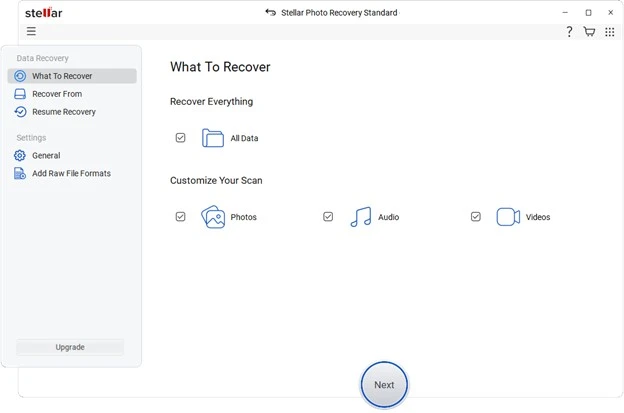
Step 2: From the home screen, select Photos or All Data (if you have to recover everything) and click Next to continue.
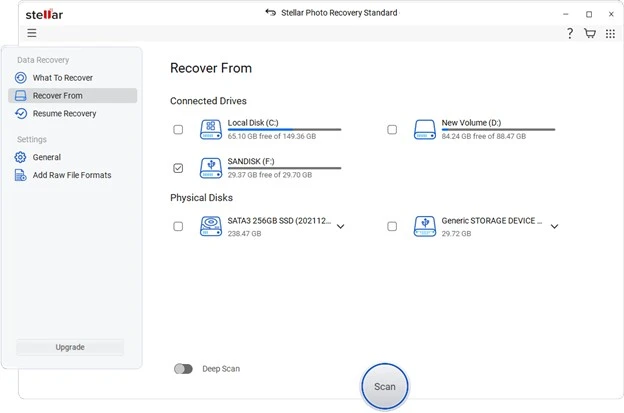
Step 3: Choose the storage drive where the deleted photos were stored and click Scan to initiate the scanning process.
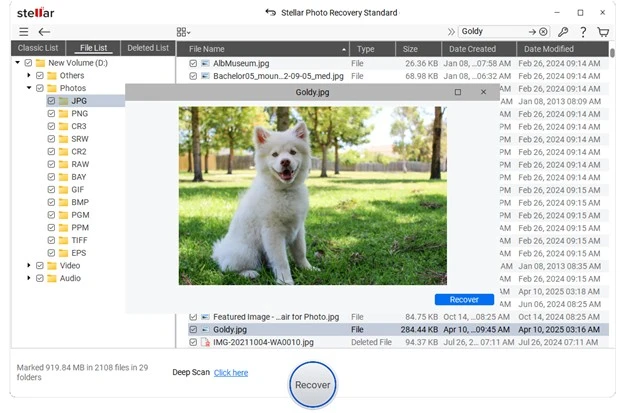
Step 4: Once scanning is completed, preview the recoverable files and select the photos you want to recover. Click Recover and save selected photos to a different storage location (external drive recommended).
Summary
While creating backups of important photos is essential, there’s no need to worry if you forgot to back them up. You can go with the quick steps to recover your lost photos – even without any backup. Success depends on storage type, usage patterns, and the recovery approach you choose. Most importantly, treat recovered photos with care and back them up immediately. Memories are priceless, but storage failures are not rare. A small backup habit today can save you from a big emotional loss tomorrow.
FAQs – Recover Old Photos Without Backup
Is it possible to recover photos deleted long ago without any backup?
Yes, you can recover old photos without any backup, if the deleted data has not been overwritten by new files. Recovery success depends on storage type and usage after deletion.
How long can photos be recovered after deletion?
There is no fixed time limit. Photos can be recovered even after months or years if the storage space where they were saved has not been reused or overwritten.
Are photo recovery tools effective?
Professional tools like Stellar Photo Recovery can scan and preview deleted photos. However, the features available depend on the version of the recovery tool you use.